
Turn your Figma designs into working apps
Designers spend hours in Figma crafting the perfect interface. Then a developer has to rebuild it from scratch in code. Baiker closes that gap — paste your Figma frame URL directly into the builder and watch it become a live, interactive React app.
How it works
Click the Figma icon in the chat toolbar to open the import panel. It has two fields: the Figma frame URL and your Figma Personal Access Token (PAT). Paste the link to any Figma frame in the first field — right-click a frame in Figma and choose "Copy link" to get it. Then paste your PAT in the second field.
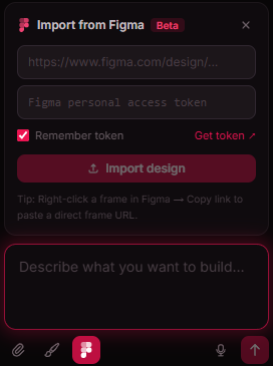
If you don't have a token yet, click "Get token ↗" to go straight to your Figma settings page. Under "Personal access tokens", generate a new token with read access. Check "Remember token" in the panel and Baiker will save it in your browser so you only need to do this once.
Hit "Import design" and Baiker fetches the frame image and layout data directly from the Figma API. It then generates React code with Tailwind that faithfully reproduces your design — not as a static mock, but as an interactive app with real state and working UI logic.
What it's good for
Product designers who want to test interactions without waiting on engineering. Freelancers who can take a client's mockup and deliver a working prototype in minutes. Developers who want to skip the pixel-counting phase and go straight to logic. Anyone who's ever looked at a Figma file and thought "I just want to click this thing."
The import works best with clean, structured designs — dashboard layouts, form screens, card grids, navigation patterns. Complex illustrations or heavily branded marketing pages are harder, but functional UI translates remarkably well.
Tips for best results
Link to a specific frame rather than the top-level file URL. The more focused the frame, the more accurate the output. If the colours aren't quite right, open the Design panel in Baiker before importing and set your primary colour to match your Figma brand colour — the generated code will use that token throughout.
Once you've saved your token, imports take just a few seconds. You can import a new frame into an existing project to extend it, or start fresh each time.
Iterate from the design
Once the first generation lands, you iterate exactly like any other Baiker project. "Make the button full-width on mobile", "Add a loading skeleton for the table", "The nav items should highlight on hover" — short follow-ups that push the design forward without touching a code editor.
The result is shareable, deployable, and yours. Publish it as a public link, or deploy it to your own subdomain in one click.